Audio Stem
Exporter
Record any OBS audio source directly to MP3, WAV, or AIFF — no conversion needed.
The only OBS plugin that writes MP3 directly.
No post-processing. No DAW. No conversion step.
Hit record, get an MP3.
Records while you stream — with barely any CPU overhead.
Finally, a way to capture your set without sacrificing your stream.
Free · OBS Studio 30+ · Windows x64 · macOS Intel & Apple Silicon · Linux x86_64
| Platform | File |
|---|---|
| Windows Installer (recommended) | AudioStemExporter-1.0.1-Windows-x64-Setup.exe |
| Windows ZIP (manual) | AudioStemExporter-1.0.1-Windows-x64.zip |
| macOS Installer (recommended) | AudioStemExporter-1.0.1-macOS.pkg |
| macOS ZIP (manual) | AudioStemExporter-1.0.1-macOS.zip |
| Linux x86_64 ZIP | AudioStemExporter-1.0.1-Linux-x86_64.zip |
Requires: OBS Studio 30+
Features
No conversion, ever. A 2-hour set at 320kbps is ~275MB vs ~1.2GB WAV.
Choose your format per source. Full flexibility.
Mic, browser, media playback, desktop audio — if OBS sees it, you can record it.
Each source gets its own file. Stems for days.
Auto-starts and stops with OBS recording. Set it and forget it.
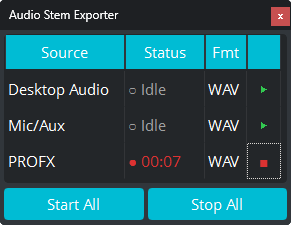
Control all your sources from one tidy panel inside OBS.
Pro Tip
One source, every format.
Add the filter twice to the same audio source and capture MP3 and WAV simultaneously. Archive your set in compressed MP3 while keeping a lossless WAV for editing — both from a single recording pass.
Perfect for DJ laptops
Running Rekordbox, Serato, or Traktor while streaming on the same machine? There's no headroom left for video recording. Audio Stem Exporter captures your mix as a high-quality MP3 with barely any CPU overhead — so you never lose a set.
Can't stream and record video at the same time?
Audio Stem Exporter uses a fraction of the resources of video recording. No encoding, no heavy processing — if your PC or Mac can run OBS, it can run this. Capture your audio stems while you stream, no matter how old your hardware is.
Perfect for content creators
Recording a stream or podcast? Capture each source as its own stem — mic, game audio, music, chat — so you can edit Reels, Shorts, and highlights with full audio control. No more stuck with a flat mix.
How to Use
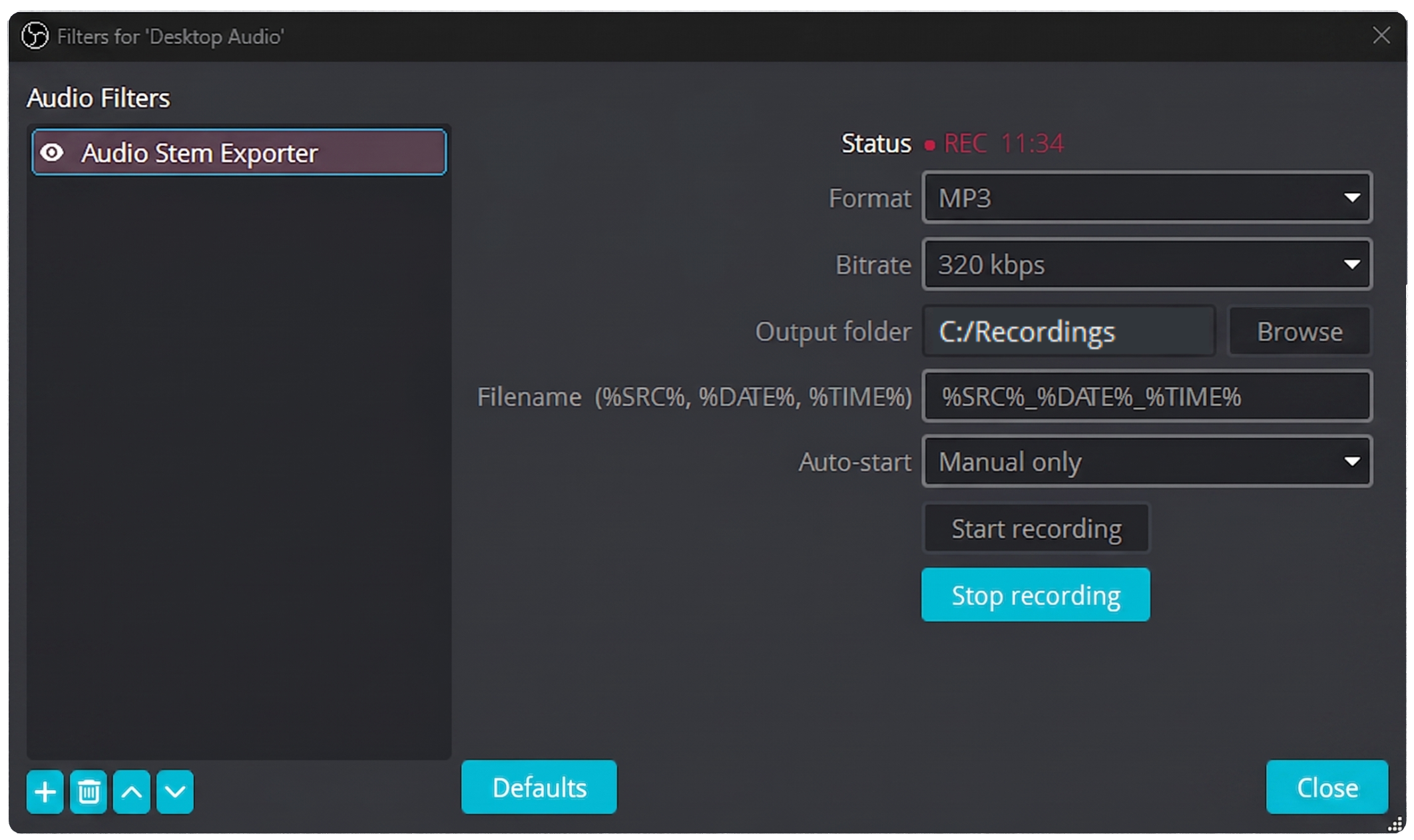
Right-click any OBS audio source → Filters → click + → select Audio Stem Exporter
Pick MP3, WAV, or AIFF. Set the destination folder. Done.
In OBS click Docks → click Audio Stem Exporter — the panel will appear in your OBS layout so you can control all your sources without opening filters every time.
Your mix records directly to the file — no conversion step, no extra software.
FAQ
Does this work on macOS?
Mac is supported. Download the .pkg installer, double-click it, and restart OBS.
Which OBS version do I need?
OBS Studio 30 or higher. The plugin uses the modern OBS filter API introduced in v30.
Will the download link stay current for future versions?
Yes — all links point to /releases/latest on GitHub, so they automatically serve the newest version without any website updates needed.